Manage Roles
 Admin User
Resource roles are used for cross-project resource portfolio analysis and the BOEMax Process Library. All projects within a given ProjStream tool (BOEMax, MaxTeam or EVMax) share the list of resource roles. The common set of resource roles may or may not match the detail level resources defined in the project specific or global resource structures. As needed, you can define project specific detail level resources and map them to the common set of resource roles. When you intend to use the MaxBoard interactive resource capacity and demand analysis views, be sure to assign resource roles to the detail level resources in the project specific or global resource structures.
 Implementation Tips
- Establish a convention for defining the common set of resource roles and how you want to map project resources to those roles. The resource roles and project resources can be at different levels of detail. For example, you may want to use summary level resource role categories for the shared resource portfolio analysis or the BOEMax Process Library tasks. Resources are assigned a single resource role. One or more resources in the project specific or global resource structure can be assigned the same resource role.
- Consider defining your resource roles before you start to add resources into the project specific or global resource structure. That way you can assign the resource role when you add the detail level resource in resource structure.
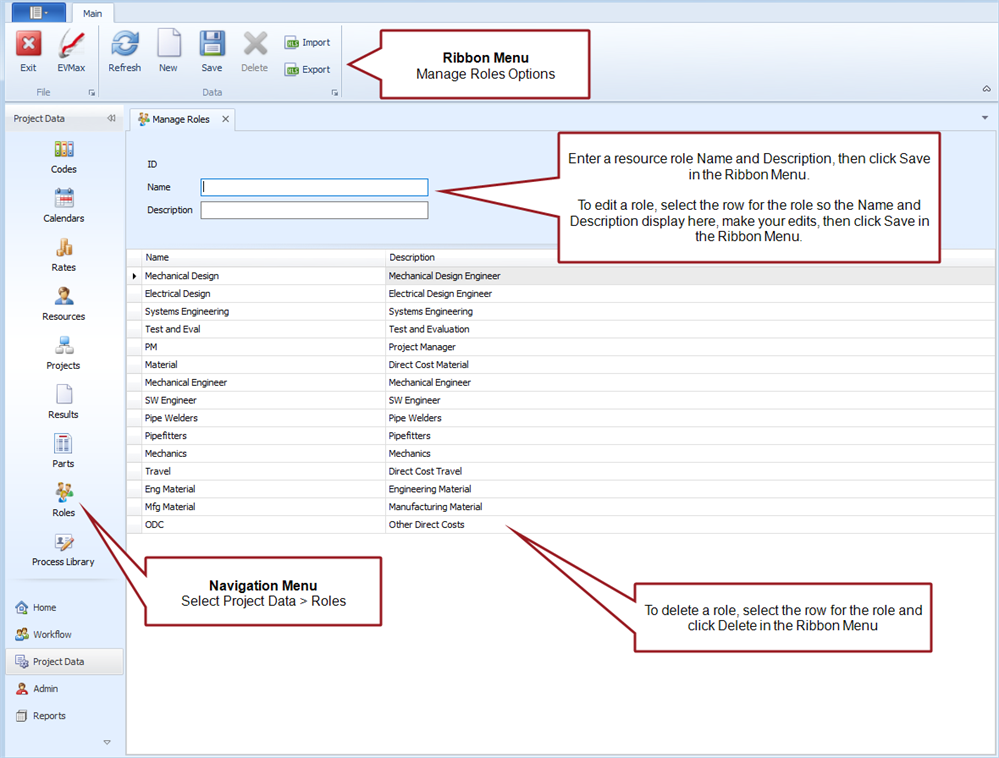
Manage Roles Tab
Main tab menu options
What to Do Next
- Assign a resource role to the resources defined for a project. Either assign a role when you add the resources or you can edit existing resources. A resource role is typically assigned to the detail level resources that are assigned to work packages. See Add Resources or Edit a Resource.